

So you are looking for a way to make your posts more effective, more impressive, more colorful, more eye-catching, more picturesque etc. Maybe you have heard that golden maxim which goes something like this "a picture is worth a thousand words". The question is how? One solution is to add screen shots. Screen shots of software or web page or dialog boxes etc (almost anything that you see on your PC screen and would like to describe to your viewers through your blog). There are many good (and not so good) commercial applications out there (just Google it and see for yourself). But if you can get almost the same (ok maybe a little bit less) functionality from a small but effective (and absolutely free) utility.
So what's this utility called? Its called MWSnap. Its tiny in size (well software that is less that 1 MB in size can be safely categorized as small-sized), only 601 KB. Here is a description about the software in developers own words;
"MWSnap is a small yet powerful Windows program for snapping (capturing) images from selected parts of the screen.
Current version is capable of capturing the whole desktop, a highlighted window, an active menu, a control, or a fixed or free rectangular part of the screen. MWSnap handles 5 most popular graphics formats and contains several graphical tools: a zoom, a ruler, a color picker and a window spy. It can be also used as a fast picture viewer or converter.
MWSnap does not require installation and does not need any special dlls, drivers or system files which can mess up your system.
MWSnap is free ware."
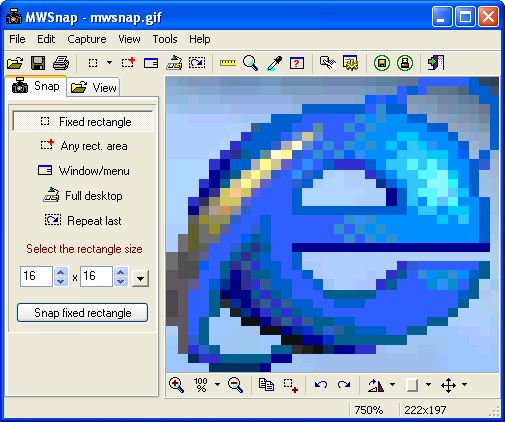
Features;
- 5 snapping modes.
- Support for BMP, JPG, TIFF, PNG and GIF formats, with selected color depth and quality settings.
- System-wide hot keys.
- Clipboard copy/paste.
- Printing.
- Auto-saving, auto-printing.
- Auto-start with Windows.
- Minimizing to system tray.
- An auto-extending list of fixed sizes, perfect for snapping images for icons and glyphs.
- A zoom tool for magnifying selected parts of the screen.
- A ruler tool for measuring screen objects lengths.
- A color picker showing screen colors with separated RGB parts.
- Fast picture viewer.
- Adding frames and mouse pointer images.
- Multilevel configurable undo and redo.
- Multilingual versions.
- Configurable user interface.
Here's some more data about the utility;
- Current stable version: 3.00.0.74
- Last update date: 06 Jul 2002
- Platform: any 32-bit Windows (including XP)
Here are the download links;
- v.3.00 as Setup (recommended): site 1, site 2 (643 KB)
- v.3.00 as ZIP file: site 1, site 2 (601 KB) Be sure to unpack internal "Lang" sub folder!
- languages pack: MWSnapLang.zip (123 KB, 16 Mar 2003)
Hope I've been of some help in your blogging endeavors. Happy blogging (full of live images). Take care!


No comments:
Post a Comment